NMOS & PMOS: Useful Applications

btn_donateCC_LG.gif

Transistors, specifically MOSFETs, I would say are the second most important component to an EE designer next to the passive compoents (resistors, inductors, capacitors).

I will show you a few useful applications that can be applied using MOSFETs that anyone working in electronics should have in there arsenal.

First lets briefly look at the two variations of MOSFETs.

You have the N-Channel MOSFET below:
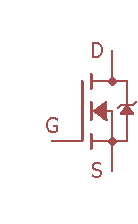
image-nmos

Then, you have the P-Channel MOSFET below:
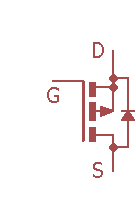
Image - PMOS.png

They have some minor differences in the way they are made and how they are used but in essences they have the same function and operate the same.

Every MOSFET has a Gate-source threshold voltage \Huge (V_\text{GS}).  This is the most important part of the FET because in order to turn on the MOSFET you need to apply a voltage at the gate that exceeds this threshold voltage.  In the datasheet of the MOSFET, you can find this value.

Now, onto the main event:

1. Using them as digitally controlled switches.

One of the most common uses for these FETs is to use them as switches.  When working with electronics, especially with battery operated electronics, you sometimes need to control when certain sensors are turned on or control when certain components get powered on in order to conserve battery power.

Here comes the FETs to the rescue.

You have two ways of accomplishing this task, using either the NMOS or the PMOS.

Note: When using MOSFETs with digital electronics, make sure you get a logic level mosfet.  Meaning that the on voltage for Vgs is between 2V-5V.

Using the NMOS, this is considered LOW SIDE switching because the source pin is connected to ground.
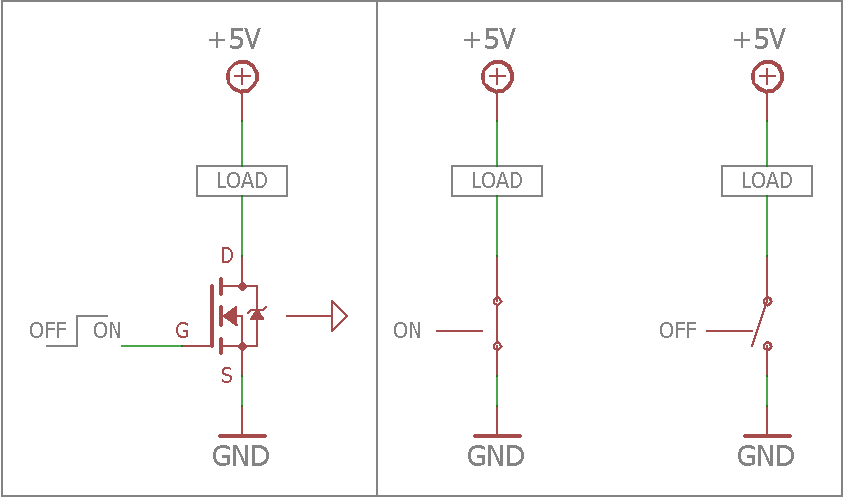
image-nmos-switch

Using the PMOS, this is considered HIGH SIDE switching because the source pin is connected to the device/component instead of ground.
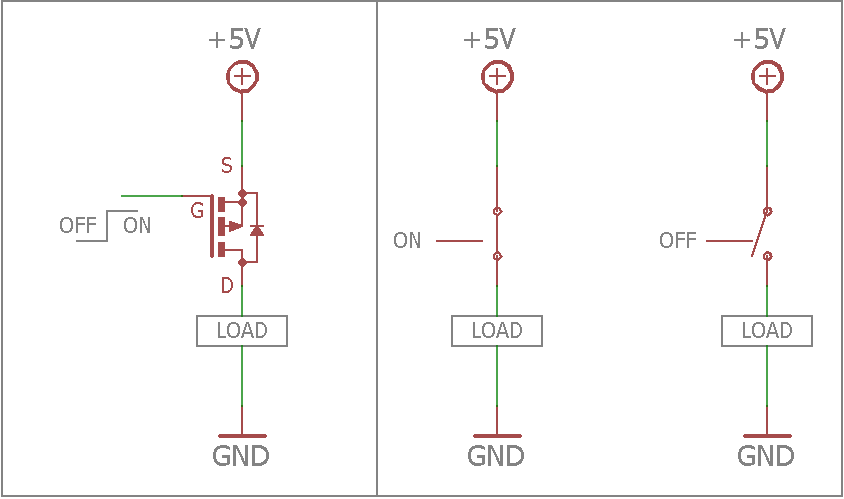
image-pmos-switch

2. Using them as logic level converters[1]

This one mostly applies to the NMOS MOSFET, I haven’t seen a configuration out there with PMOS.

Nowadays with DIY electronics being more and more popular and with a larger community of makers, you have a huge variety of microcontrollers and sensors to make the next big product. With this variant comes a variety of components with different supply voltages, ranging down from 1.8V up to 5V.  The issue with this is trying to match sensor supply voltages with your microcontroller when it comes to communicatong via I2C or SPI or even a single 1 or 0 signal. If you supply a sensor or IC with a higher signal voltage than it can handle you risk damaging the component and rendering it useless.

Here comes the NMOS to the rescue. With an NMOS you can fix this issue by making a 5V to 3.3V logic level shifter to communicate with each other while avoiding any damage.
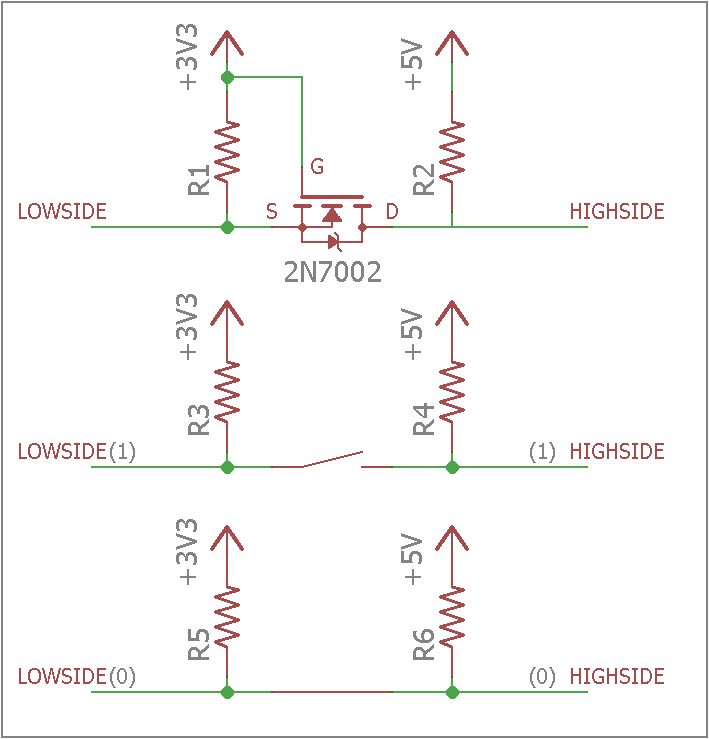
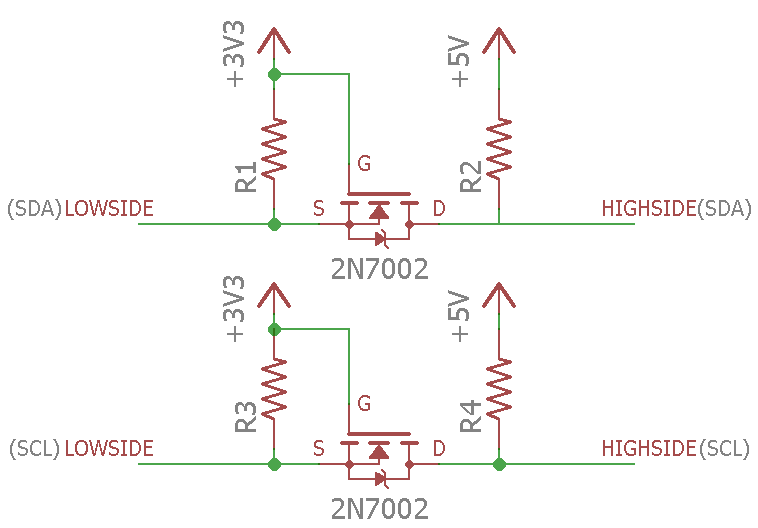
image-bi-directional-switching

image-i2c-level-switch

3. Making a constant current source.

This is one is my favorite application using MOSFETs.  For me I do a lot of testing of DC DC Converters to make sure it meets my design specifications and one test requires I have a constant current that will not fluctuate.  Using this design I am able to set the desired current for my test.

Another application is used for LEDs.  LEDs are a lot different that traditional light bulbs in that instead of operating off a voltage rating, they operate at a current rating.  Essentially you need to maintain a constant current applied to the LED to achieve your desired brightness.
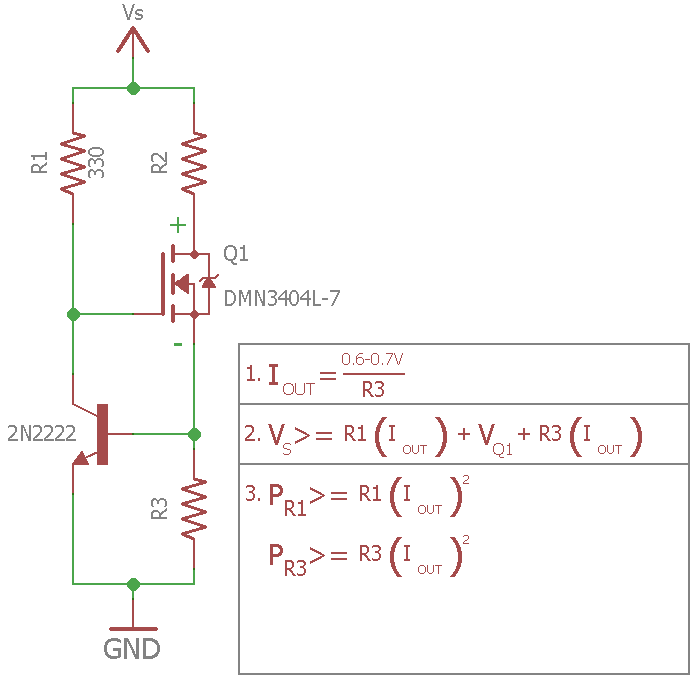
image-ccs

These are some of the three uses for MOSFETs that I normally deal with for my projects.  There’s plenty more but these were my top 3.

If you have any questions, input, corrections, please let me know in the comments below.

Enjoy building :)!

References:
1. Bi-Directional Level Shifting

2. Sparkfun Learning

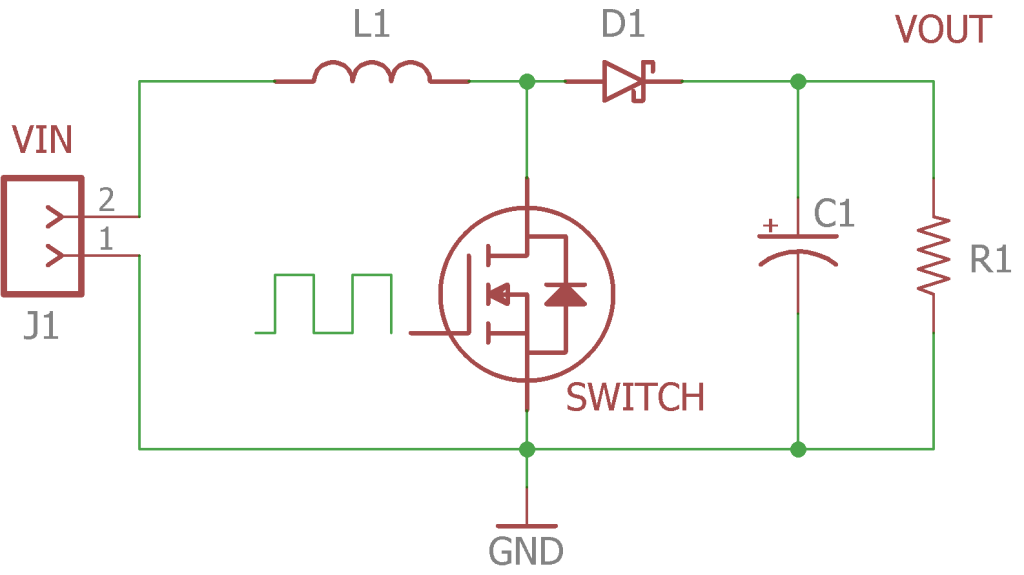
How-to: Design a Boost Converter

image-boost-converter
Figure 1: Basic Boost Converter Circuit

btn_donateCC_LG.gif

Designing a boost converter sounds complicated and intimidating, well that was always my impression when it came to this topic in school.  In reality, the design and testing of a boost converter is a lot easier than meets the eye.

Here I will walk you step by step on designing your first boost converter and how the datasheet is your best friend when designing.  For this tutorial we will be using the L6920DC IC Boost converter from skyworks.[1]

Download the Boost Converter excel spredsheet from the Resources page.

This information was referenced from TI reference report.[2]

First and foremost, download the highlighted datasheet, datasheet-l6920dc. This has all the highlighted paremeters that you will need when designing a boost converter.

Step 1:

You need to decide what are your specifications.  These are the key parameters:

  • Vin(min)
  • Vin(max)
  • Vout
  • Iout
  • n = efficiency; Most boost converters average around 85 to 90% under medium load and up to 95% on heavy load.  We will use the lowest percentage to be safe.

Example:

  • Vin(min): 1.8V
  • Vin(max): 2.4V
  • Vout: 3.3V
  • Iout: 0.4A
  • n = 87% or 0.87

Step 2:

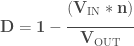
With your specifications, next step is to find your DUTY CYCLE:

\bf \Huge D= 1 - \cfrac{(V_{\text{IN}}*n)}{V_{\text{OUT}}}

We calculated the duty cycle for both lowest input voltage and highest input voltage.

  • Lowest input voltage gives you the highest switching current you will see
  • Highest input voltage gives you the highest output current your converter can produce

Example:

\bf \Huge V_{\text{IN-MIN}}

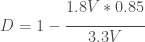
\Huge D = 1 - \cfrac{1.8V*0.85}{3.3V} = 0.52

\bf \Huge V_{\text{IN-MAX}}

\Huge D = 1 - \cfrac{2.4V*0.85}{3.3V} = 0.36

Step 3:

Next we will estimate the switching current or CURRENT RIPPLE of the Inductor:

ΔIL = (0.3) * I_\text{OUTmax} * \cfrac{(V_\text{OUT})}{(V_\text{IN})}

Example:

\bf \Huge V_{\text{IN-MIN}}

ΔIL = \Huge  (0.3) * 0.4A * \cfrac{3.3V}{1.8V} = 0.22A

\bf \Huge V_{\text{IN-MAX}}

ΔIL = \Huge  (0.3) * 0.4A * \cfrac{3.3V}{2.4V} = 0.165A

Step 4:

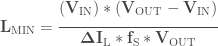
Next we calculate the minimum INDUCTANCE we need:

\bf \Huge L_\text{MIN} = \cfrac{(V_\text{IN})*(V_\text{OUT} - V_\text{IN})}{\Delta I_\text{L}*f_\text{S}*V_\text{OUT}}

\bf \Huge f_\text{S} – This is the switching frequency that the converter will operate at.

Example:

\bf \Huge V_{\text{IN-MIN}}

\Huge L_\text{MIN} = \cfrac{(1.8V)*(3.3V - 1.8V)}{0.22A*1MHz*3.3V} = 3.72uH

\bf \Huge V_{\text{IN-MAX}}

\Huge L_\text{MIN} = \cfrac{(2.4V)*(3.3V - 2.4V)}{0.165A*1MHz*3.3V} = 3.97uH

We would select the highest inductance value to meet our input voltage rage of 1.8V-2.4V

When selecting the inductor, the key parameters you need to look for is low DCR, package size, and max current the inductor can handle.

DCR – Is the resistance in the coil because at the end of the day, an inductor is still a wire. When you keep this value at a minimum, it will increase your effieciency and the ability to provide a higher output power.

In step 7 , you will calculate the maximum current the inductor will see and there you will have all the necessary parameters needed to chose the inductor.

Step 5:

Now that we have our inductor value, we can calculate the actual CURRENT RIPPLE of the Inductor:

ΔIL = \bf \Huge \cfrac{V_{IN}*D}{f_\text{S}*L}

Example:

\bf \Huge V_{\text{IN-MIN}}

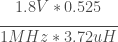
ΔIL = \Huge \cfrac{1.8V*0.525}{1MHz*3.72uH} = 0.19A

\bf \Huge V_{\text{IN-MAX}}

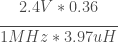
ΔIL = \Huge \cfrac{2.4V*0.36}{1MHz*3.97uH} = 0.18A

Step 6:

Next we need to calculate the MAX OUTPUT CURRENT the boost converter can output:

\bf \Huge I_\text{MAXOUT} = \bf  \Huge (I_\text{LIM} - \cfrac{\Delta I_\text{L}}{2}) * (1 - D)

I_\text{LIM} – This is the current switch limit of the boost converter.

Example:

\bf \Huge V_{\text{IN-MIN}}

\Huge I_\text{MAXOUT} = \bf  \Huge (0.8A - \cfrac{0.19A}{2}) * (1 - 0.52) = 0.33A

\bf \Huge V_{\text{IN-MAX}}

\Huge I_\text{MAXOUT} = \bf  \Huge (0.8A - \cfrac{0.18A}{2}) * (1 - 0.36) = 0.45A

Step 7:

Next we will calculate the MAX SWITCHING CURRENT, I_\text{SW} the Inductor will see.  This value cannot exceed the ILIM value of the boost converter:
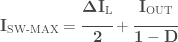

\bf \Huge I_\text{SW-MAX} = \cfrac{\Delta I_\text{L}}{2} + \cfrac{I_\text{OUT}}{1 - D}

Example:

\bf \Huge V_{\text{IN-MIN}}

\Huge I_\text{SW-MAX} =  \cfrac{0.19A}{2} + \cfrac{0.4A}{1 - 0.525} = 0.94A

\bf \Huge V_{\text{IN-MAX}}

\Huge I_\text{SW-MIN} =  \cfrac{0.18A}{2} + \cfrac{0.4A}{1 - 0.36} = 0.72A

Note: \Huge I_\text{SW-MAX} value cannot exceed \Huge I_\text{LIM} which can be found in the datasheet.  In this example we see that with a low input voltage, the switching current exceeds the limit in the datasheet.  The boost converter might still be able to output the desired current at that low input voltage because \Huge I_\text{LIM} is the minimum switching current it can handle.  But better to be safe than sorry.

Here you can see the inductor will see a max of 0.94A at its lowest input voltage. Now we can chose the inductor for our design.

For this design I went with,MSS5131-472MLB, a 4.7uH inductor from coilcraft.[3]

Since I chose an inductor that has a higher value than previous calculated, the inductor current ripple and output power will be slightly lower but it will not effect your design negatively.

Step 8:

This step is only if your boost converter has an adjustable output voltage.

(This boost converter is a fixed output and does not require these resistors.  Step 8 values are dummy values but the process )

Here we will find R1 AND R2 values for the feedback network:

\bf \Huge I_\text{R0.5} >= 100 * I_\text{FB}

\bf \Huge I_\text{FB} – This is the current that the feedback resistor draws.

\bf \Huge R_2 = \cfrac{V_\text{FB}}{I_\text{R0.5}}

\bf \Huge V_\text{FB} – This is the feedback reference voltage


\bf \Huge R_1 =  R_2 * (\cfrac{V_\text{OUT}}{V_\text{FB}}-1)

Example:

\Huge I_\text{R0.5} >= 100 * 350nA = 35mA

\Huge R_2 = \cfrac{1.24V}{35mA} = 35.4kΩ

\Huge R_1 =  35.4k \Omega * (\cfrac{3.3V}{1.24V}-1) = 58.74kΩ

Step 9:

Next l, we will calculate the INPUT CAPACITOR and OUTPUT CAPACITOR needed to minimize the ripple going in and out of the system:

First, you find your input capacitor:

\bf \Huge C_\text{IN}: Typically this value is 4.7uF to 10uF

Next, we need to first to look at these two equations below[6]:

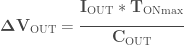
\bf \Huge \Delta V_\text{OUT}= \cfrac{I_\text{OUT} *T_\text{ONmax}}{ C_\text{OUT}}

\bf \Huge T_\text{ONmax} – This is the maximum on time of the boost converter.  It is also written as

\bf \Huge D * T_\text{S}

Were \bf \Huge T_\text{S} = \cfrac{1}{f_\text{S}}

\bf \Huge \Delta V_\text{OUTesr} = ESR* I_\text{SW-MAX}

ESR – All capacitors are not ideal capacitors and therefore have what is known as Equivalent Series Resistance. This is an important parameter that you need to consider when choosing the right output capacitor.

Example:

Cin = 10uF

First, we need to choose a voltage ripple that we can live with. Here I chose 50mV, and if we rearrange the first equation, we get:

 \Huge \Delta C_\text{OUTmin}= \cfrac{0.4 *6.25us}{50mV} = 50uF

Now we have a couple of options to choose from when it comes to materials for capacitors.

Most common are ceramic and electrolytic capacitors.  Each have there own pro and con.

Ceramic capacitors offer lower ESR for lower ripple but they typically do not have the bulk capacitance.

Electrolytic capacitors have bulk capacitance but generally have a high ESR that adds to ripple.

In this case I decided to go with both, getting the benefit of bulk capacitance and low ESR.

I went with a 1206 package, 10uF ceramic capacitor and a 47uF Electrolytic in parallel. For the electrolytic, they also have an aluminum polymer that has high capacitance with the added benefit of low ESR. I went with a 47uF that has an ESR of 40mΩ.

Now we plug in the values we got back into the equations and we get:Special Note: For ceramic capacitors, you need to be careful of which class and package size you choose because you only see a certain percentage of your nominal value (ex. 1206 10uF X7R will see 73% of 10uF)[4]. Click here for more info. I generally go with 1206 or 1210 with capacitors.

\Huge \Delta V_\text{OUT}= \cfrac{0.4A * 6.25us}{50uF} = 50mV

\Huge \Delta V_\text{OUTesr} = 40m\Omega*0.94A = 37mV

\Huge \Delta V_\text{OUT} = 87mV

Always refer to the datasheet and compare recommended value vs calculated[1]

You’ve now designed your own boost converter regulator.  See it wasnt too hard :).

I will post this project soon that has the schematic and bill of materials, it’ll be under the projects menu bar, stay tuned!!

Feel free to comment below and correct me if anything seems incorrect to you.

References:

1. L6920 Datasheet

2. TI Basic Calculations of a Boost Converter Power Stage

3. Coilcraft Inductor

4. Temperature and Voltage Variation of Ceramic Capacitors

5. Ceramic or electrolytic output capacitors

in DC/DC converters—Why not both?

6. Boost Converter Output Capacitor Selection